 CaixaUnica
One unified investment portfolio: B3, Avenue, and Binance in a single place
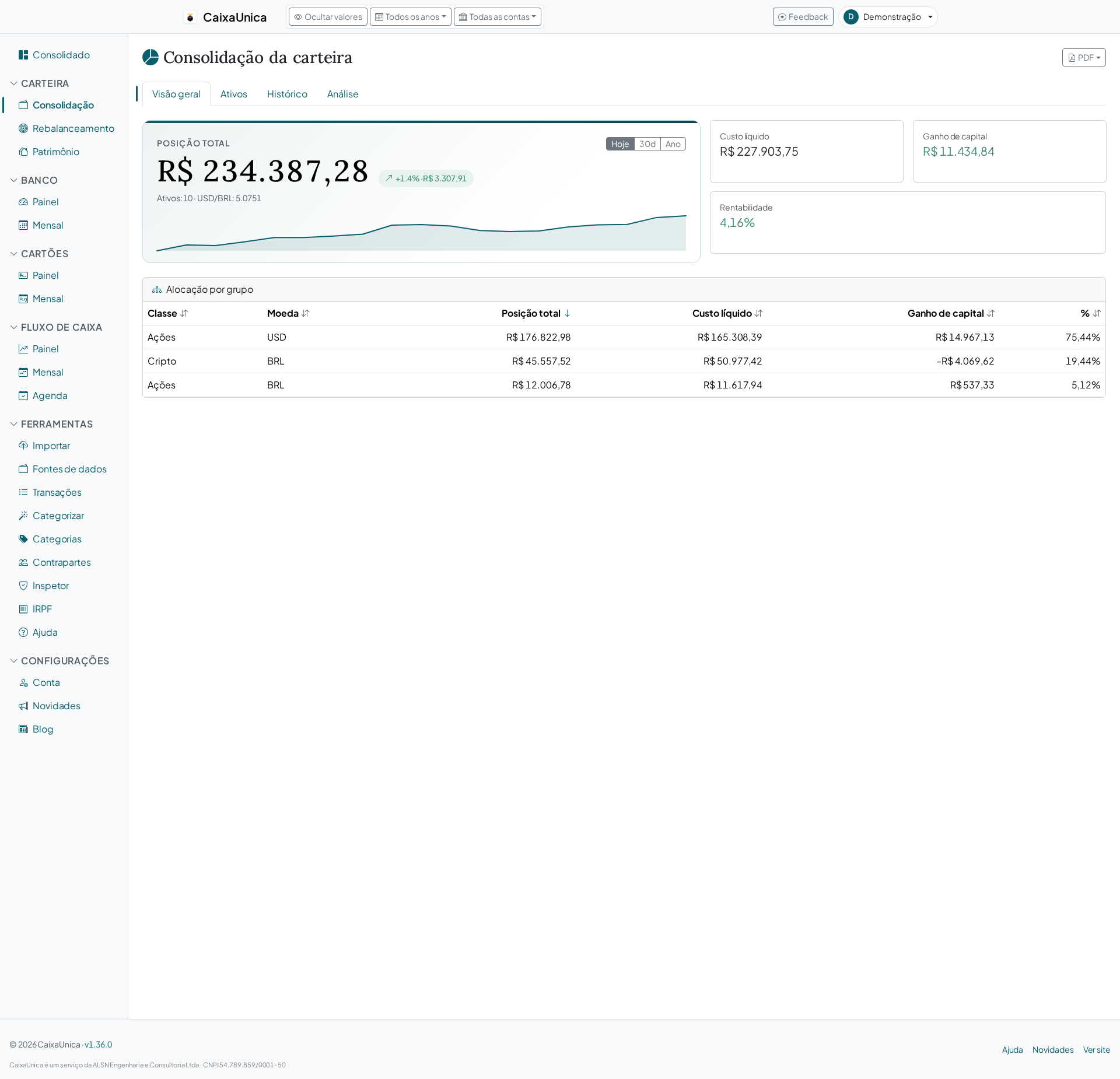
Anyone who invests through more than one brokerage knows the problem: your stocks are on B3 via one broker, your US ETF at Avenue, your crypto on Binance — and the only way to know what you really hold is to open three apps and add it up in your head. CaixaUnica's Portfolio module exists to end that mental math: you import the reports and it consolidates everything into a single view.
Where the data comes from
The Portfolio doesn't ask for your brokerage password and doesn't scrape anything. It reads the report the institution itself already gives you — the same file you'd download to keep on record or send to your accountant:
- B3 — the trade and movement reports from the investor portal, which consolidate all your brokers (XP, Rico, NuInvest, Clear, Toro…) into a single file, covering stocks, real estate funds (FIIs), and fixed income.
- Avenue — your positions and movements in the US market.
- Binance — crypto history. The Transaction History is the recommended file, because it covers everything in one place; the dedicated reports (deposits, withdrawals, fiat purchases) are optional.
- Open Finance — Tesouro Direto (government bonds), CDB/RDB, LCI/LCA, and fund positions flow in on their own when you connect the institution.
On the Upload page, the detector identifies the format from its contents and suggests the right importer. Each row gets a unique fingerprint, so re-importing the same file never doubles your position — you can upload your entire history without worry.
What the portfolio calculates for you
With the reports in the system, the Portfolio stops being a list of operations and becomes an answer:
- Current position and average price per asset, from every imported buy and sell.
- Allocation by class and by currency — equities, fixed income, funds, crypto, and international positions, each group with its own subtotal.
- Currency exposure — how much of your wealth is in US dollars, updated by the exchange rate.
- Per-asset performance and evolution over time, with quotes fetched automatically for supported assets.
Crypto without the average-price headache
Crypto is where cost calculations usually break: swaps between coins (an alt to BTC, for example) and external deposits confuse any spreadsheet. CaixaUnica prices each operation in Brazilian reais on the date it happened and groups the legs of each trade, so your average price and gain/loss come out coherent — including crypto-to-crypto swaps, which normally destroy cost-basis math.
When a sale has no priced buy before it (the classic case of an external deposit followed by a sale), the system is conservative and doesn't invent profit — instead of booking the whole sale as a gain, it flags it for you to check.
The portfolio doesn't live in isolation
The Portfolio's consolidated position feeds into the consolidated dashboard alongside your bank, card, and cash flow — so your total net worth shows up in one place, not scattered across modules.
At income tax time
Each asset class has a yearly view, designed for filing season: your position at year-end and realized gains/losses, in the format you need to check against what goes (or already went) into the tax software — exportable as a PDF, along with the consolidated portfolio report. For assets that arrived by external deposit with no purchase price, there's a per-asset reconciliation table where you can inject a reference price per year — handy for cross-checking your income tax without compromising the cost basis of the rest of your portfolio.
Where to start
- Download a report from a brokerage (B3, Avenue, or Binance).
- Upload it on the Upload page — the format is detected on its own.
- Open the Portfolio and watch your position, average price, and allocation appear.
In a few minutes you trade the mental math for a real, up-to-date picture of where your invested money sits.